Native Compute and Chemical Space
Use the Mac app to analyze a molecular collection, generate 3D conformers, or explore a similarity map. These workflows use Burette’s desktop compute service; they do not require a separate xTB or CREST installation.
Metal acceleration requires compatible Apple hardware and a working compute runtime. A CPU reference path is available for supported operations and policies. Check the job report for the backend actually used, fallback reasons, and failed records rather than assuming every calculation ran on the GPU.
Explore a collection in Chemical Space
- Open a molecular collection with valid structures, such as SDF, SMILES, or a CSV with a molecular column.
- Open Chemical Space from the collection’s analysis actions.
- Choose the representation, similarity measure, and projection options available for that collection.
- Generate the map and inspect the result in 2D or 3D.
- Select points or lasso a region. The linked grid shows the corresponding molecular selection.
- Inspect the molecules and their properties before exporting a subset.
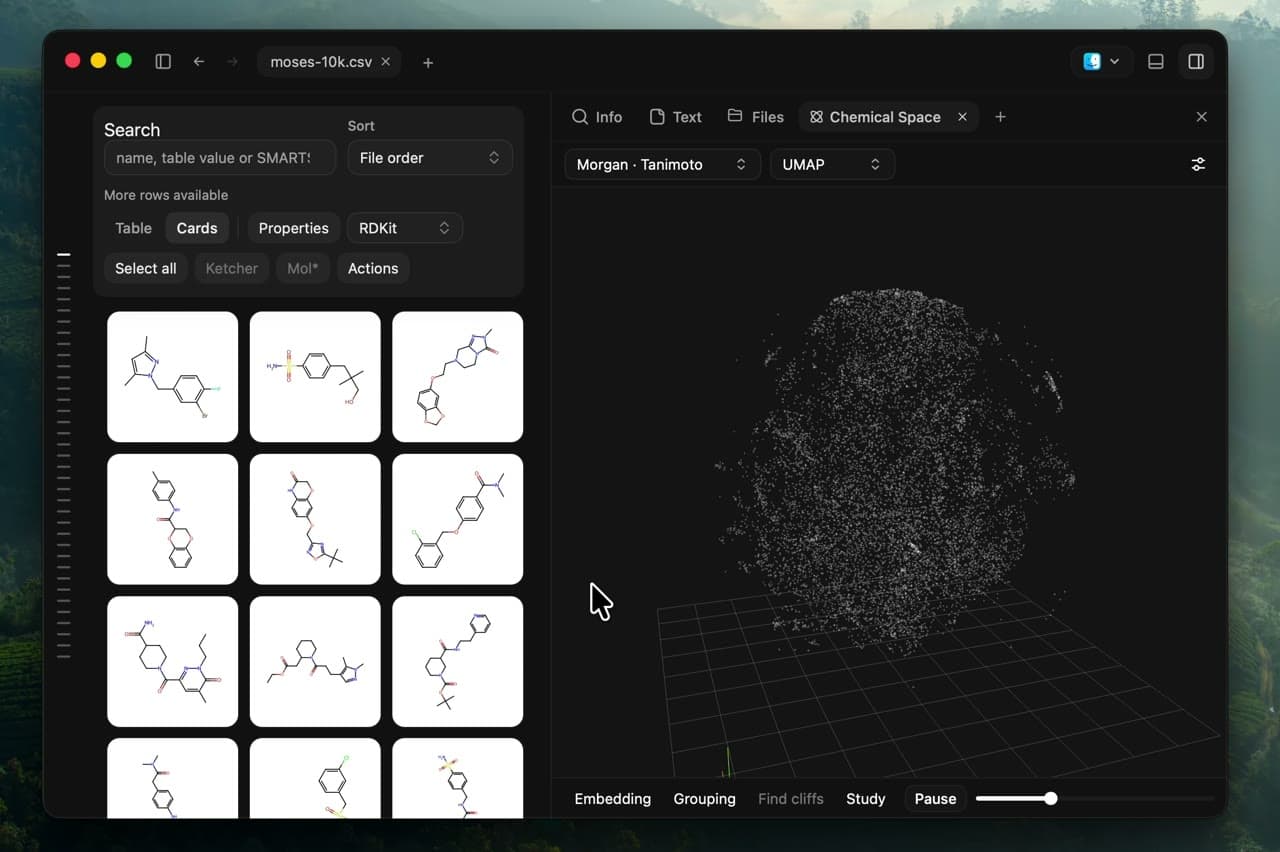
Each point represents a compound. A similarity projection helps locate groups worth inspecting; its axes are not molecular properties or physical coordinates. Nearby points are neighbours in the chosen projection, not proof of shared biological activity. Changing the representation or projection settings can change the map.
Activity colouring needs a suitable numeric property column. Activity-cliff analysis looks for similar molecules with different recorded activities. Check assay context, units, and missing values before interpreting those differences.
Cluster and find similar molecules
Choose Cluster selected, Cluster filtered, or Cluster all to define the input scope. The job uses a frozen snapshot of those records and reports cluster assignments and representatives. Invalid molecules should be reviewed through the reported record status.
After a successful clustering run, select one molecule and use Find similar to search the saved fingerprint snapshot. Similarity results depend on the fingerprint and metric used; they are not a docking score or activity prediction.
Export diverse exports representatives from that analysis with structures, a table, and provenance. If you change the source collection, rerun the analysis when you want those changes included.
Generate conformers and refine geometry
The collection’s Generate 3D action and Ketcher’s Compute menu expose supported native 3D generation workflows. Settings control the engine, candidate count, and RMSD threshold. The native pipeline includes distance geometry, ETKDG-style constraints, stereochemistry checks, and MMFF94/MMFF94s refinement where supported.
Review per-molecule failures and convergence status. Generated conformers are candidate geometries; check stereochemistry, protonation, charge, and method suitability before using them downstream. Use CREST when you specifically need the external CREST sampling workflow.
Compare poses
Alignment and scoring workflows report geometric comparisons such as RMSD, shape, and electrostatic terms. They require suitable 3D coordinates and atom correspondence for the selected method. A favourable alignment or score alone does not establish binding affinity.
Viewer All and Align controls are for inspecting overlaid poses; distinguish that visual comparison from a separate calculation report.
Semiempirical calculations
The native service includes single-point semiempirical methods such as RM1, AM1, and PM6. Read the reported method, electronic state, convergence, and provenance. A single-point result does not mean the geometry was optimized. External xTB calculations use a separate executable and workflow.
Progress, cancellation, and results
Follow jobs in the desktop workspace. Cancellation can wait for an active calculation step to return. Partial reports, when offered, contain only completed work and must not be treated as a successful result for the whole input.
If an action is unavailable, check the selected scope, structure data, and runtime status. Finder Quick Look, the website demo, and the iPhone preview app do not provide the full native compute workflow.